Monday, May 23, 2011

Portraits

Shoulder and Up

Canon EOS REBEL T2i

Sat May 21, 2011 11:37 AM

Duck Pond

f/5.6

1/400

I took this picture at the duck pond here in Rexburg and then took it into photo shop and did some touching up. Touch-ups included masking out everything but the background and blurring that along with a little more contrast on it. I also airbrushed her face a bit and took it into camera RAW where I lightened her ear rings and put a vignette on the edges.


Close
Canon EOS REBEL T2i

Sat May 21, 2011 11:40 AM

Duck Pond

f/5.6

1/250

Like the previous one, I did some air brushing and also some non-destructive editing with levels and vibrance. Then I took it into RAW and added the vignette to make it pop a bit more.


Golfing

Canon EOS REBEL T2i

Sun May 22, 2011 7:04 PM

Golf Course, Rexburg

f/5.6

1/400

Saw the flag on the golf course and just had to take something with it. Didn't do much with the photo. Just raised the levels a bit and the vibrance a touch. Put a little vignette on in RAW.


Candid

Canon EOS REBEL T2i

Sun May 22, 2011 7:47 PM

Duck Pond

f/5.6

1/1000

Shot of the ladies getting things straight before the next shot. I added a vignette in RAW and played with the levels and the vibrance. Also added some contrast to this one.


Brunettes

Canon EOS REBEL T2i

Sun May 22, 2011 7:29 PM

Golf Course, Rexburg

f/5.6

1/800

This one I went and airbrushed their faces a bit. Blurred the background and masked them out of the blrr effect while bringing back some focus to their feet by brushing at 70%. Added levels, vibrance, contrast and a vignette.


Early Morning

Canon EOS REBEL T2i

Mon May 23, 2011 6:38 AM

Romney BLDG

f/5.6

1/125

An early morning janitor in the Romney making the floors shine. Didn't do much here in post. Once again just levels, contrast and added a Vignette.

Monday, May 16, 2011

RAW Edits


Backyard Flower

Canon EOS REBEL T2i

Monday, May 16, 2011 8:10 AM

Rexburg ID

f/5

1/400

These were some flowers that sprung up in my backyard. I took the photo in to bridge to edit it in camera RAW. I boosted up the vibrance and added a vignette. I also upped the contrast a touch. The vignette really makes the boca stand out more and in turn really makes the flower pop more.


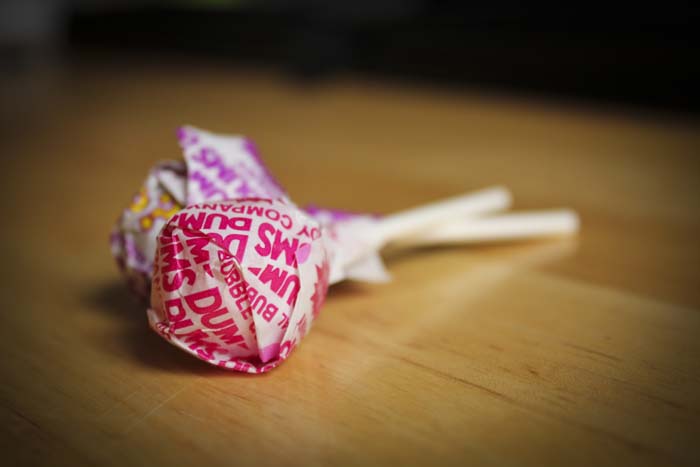
Dums

Canon EOS REBEL T2i

Monday, May 16, 2011 8:10 AM

Rexburg ID

f/5

1/100

These are just some DumDums that were on my table in my kitchen. There was a nice overcast light coming through the window on them so it made for a nice still life. I used large aperture to get a lot of natural boca so i wouldn't have to add any later on. Then in camera RAW I added the a vignette and brought out the color by boosting the vibrance. I like the contrast of the vignette and the pink in the dumdum. Also I like how the vignette really made the back nice and dark.

Panoramic


Wood Stock

Canon EOS REBEL T2i

Wednesday, May 13, 2011 4:24 PM

Rexburg ID

f/10

1/500

Tripod

For this compilation I took a bunch of photos of my back fence/fire pit. Then I took them into photoshop and photo-merged them. After getting a jpeg I opened it up in bridge where i edited it in camera raw. Here I darkened the exposer and used an adjustment brush to pain some lighter areas in along the fence. Then I added a vignette along with some saturation. I took the shots using my tripod and loosened the plate so I could swivel the camera and get a straighter shot.

Monday, May 9, 2011

Flexible Edits


Greenie

Canon EOS REBEL T2i

Duck Pond

f/6.3

1/800

For this shot I used adjustment layers. First off I used one for levels and raised those a touch.Then I added the vibrance layer and raised the colors a little. Then I filled the mask with black paint and lowered my opacity to 50% and unmasked the beak area to bring a bit of the vibrant color back. Then I lowered the opacity more to around 25% and unmasked the greener areas of the head and neck. Then I added a new layer, filled it with black, got a huge feather brush and took out the middle so there were only edges left. Then gave it an overlay blend and lowered the opacity of the layer to 20%.

Gliding

Canon EOS REBEL T2i

Duck Pond

f/5.6

1/1600

For this shot I converted it to a smart object and then applied the ink outline filter on it. After that I once again filled the mask with black paint and lowered my brush opacity down to around 20% and began to brush away the mask over the ducks body. I like this effect because it actually makes the duck look sharpened while making the color more deep. And it has a extra glassy look when applied to the water.

Flora & Fauna

Testing the waters

Canon EOS REBEL T2i

Duck Pond

f/6.3

1/1600

This was taken on an overcast day at the duck pond. This one is probably my favorite photo of the three. I raised the levels a touch on it but thats pretty much how it looked when I took the shot. I was using a 100-300mm off brand lens because the birds are a little skiddish. I kept the shutter speed at 1/1600 because they tend to move a lot.


Bud

Canon EOS REBEL T2i

Duck Pond

f/5

1/1600

This shot I took of one of the trees at the same pond where the buds are just starting to come in. For this shot I switched to my stock lens so I could get nice and close to it and add some boca around the buds. I decided not to do anything with this shot so this is straight from the card to the blog.


Munchies

Canon EOS REBEL T2i

Duck Pond

f/5.6

1/2000

After awhile I decided to try and get some action shots. This I shot through the trees with my longer lens (you can see the blur from the close tree limbs). I once again just raised the levels a little and thats all the post work that was done for this guy. Used a fast shutter speed to get crisp action.

Monday, May 2, 2011

Blends and Type

Wicker Chair
Canon EOS REBEL T2i
3/30/2011 – 10:24 AM
My Backyard
f/3.5
1/2000 sec

Skackly
Canon EOS REBEL T2i
3/30/2011 – 10:22 AM
My house wall
f/3.5
1/4000 sec

For this shot I combined the two above pictures so that the wall photo would give a good texture on the chair photo. Basically I made a selection from the green channel and made that onto a layer mask so it kept only the shadows from the wall photo. Then with that I lowered the opacity of the brush tool so it would lighten the wall shadows where the grass was. Next I used a pin light blending option to better blend them. And last I created a new layer, filled it with a light tan color and blended it with a color burn blend option.

Bench'd
Canon EOS REBEL T2i
3/30/2011 – 10:23 AM
My Backyard
f/4.5
1/1000 sec

For this I took the bench photo and raised the levels a touch. The I wrote RELAX and added a bevel and emboss and a dropped shadow. Then I made sure the light source for the dropped shadow was going the same direction as the light in the picture. Then I option clicked in between the layers to make it fill the text with the photo. After that I created a new back ground layer and created a couple of rectangle shapes with the shape tool and decreased the opacity to make the text pop a little more.

Color Study

Stand Out
Canon EOS REBEL T2i
3/31/2011 – 7:16 AM
Library
f /3.5
1/40 sec
For this shot I wanted to single out the red book so I put it among books of a different color and then took the shot from this angle as to get the red book in focus and still having some blur in the background.

Old
Canon EOS REBEL T2i
3/30/2011 – 10:25 AM
My Backyard
f /5.6
1/100 sec
This is just a roommates bike in our back yard. Its pretty cool cause it's not the usual bike and it had a nice red paint job.


Lone Pole
Canon EOS REBEL T2i
3/31/2011 – 7:24 AM
Taylor building grass
f /5.6
1/640 sec
This is a red and white striped pole in the grass. I zoomed in and focused on the pole itself as to create a lot of back blur.

Flower'd
Canon EOS REBEL T2i
3/31/2011 – 7:31 AM
Austin Bldg.
f /9
1/64 sec
One of the many flowers here. It was nice in the morning with sun streaming through the window onto the flowers.